Tuesday, October 27, 2015

Podcasting
One of the challenges I see using podcasting in my third grade classroom, at least as an instructional tool, is making sure that everyone has access to it. If I were to put necessary instructional material on a podcast, I would not be sure that all of my students would be able to access and use it from home. I do see the potential of using it in the classroom, possibly as part of a center, when I would be working with a different set of students. The kids in that center could listen to either a podcast that I had prepared or another relevant podcast that someone else has already made. I think another benefit to using podcasts in my classroom would be to keep parents involved and up to date. They could be included in my class blog, and could actually have students involved in sharing and explaining what we've been doing.
Students creating their own podcasts could have several benefits. It allows them to write creatively for a new purpose than they might have been used to before. It also can give them a better sense of "audience", which is a concept that can be tough to think about when just writing in a journal or on a piece of paper. Creating a podcast can also have a positive effect on students reading fluency skills, as well as helping them to try to incorporate "voice" into their writing (which of course they will actually use on their podcast).
Monday, October 19, 2015
Chrome App
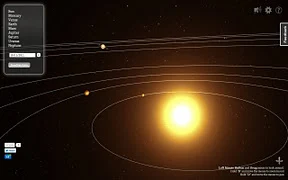
The above link is to the 3D Solar System Web app. This is a really cool app that I actually spent a lot of time playing with when I first found it. I am going to use it during our solar system unit when teaching a lesson about the planets' orbits around the sun. It gives them a great visual of the path that each planet takes. Something I really like is how it pretty realistically shows the planets locations in relation to each other. The students can see how far out some of those gas giants are and how relatively close to the sun the terrestrial planets are. Another cool feature is that you can type in any date and see where all of the planets will be. You can then hit play and watch as the planets actually revolve around the sun in "real" time as the date changes. Finally, you can create tours to stop at different places in the solar system that will just take the students to wherever you want them to go. You can also share these when finished. I was beginning to create mine, when I saw someone created an "Around the Solar System" tour. I watched it and it would be perfect to use in my classroom. No need to reinvent the wheel (open source content right?).
Open Source Content
Open source content is great way to find and share ideas in a quick and easy manner. It is an alternative to the standard textbook/basal ways of the past. It is a far more economical way for teachers and districts to find content and materials, rather than purchasing these incredibly expensive programs or paying for access to online sites. The availability of open source content gives schools and teachers a lot more of a voice in planning how they are going to teach the standards. It gives them choice rather than being stuck with the sole opinion of one of the ever-growing education super-companies (there's one that starts with a P that comes to mind). Still, if you are going to go that route, you would have to be vigilant. There is absolutely a lot of great stuff out there, but there is also a lot of junk. Just because something is found on the Internet or requires the use of a certain piece of technology, doesn't make it inherently better. In the end, it is up to every teacher to make use of everything that is available to them in order to reach their students. What I appreciate about open source content is that it expands the material that is available greatly.
Tuesday, October 13, 2015
Google Classroom
1. Google Classroom is much more interactive than a traditional website. Teachers can post assignments that can be completed and then given feedback, all through the Classroom. It also allows teachers to start discussions and lets students share their ideas easily with each other. Teachers can quickly share class materials that will be useful to the students work. Also, the students are alerted when the teacher adds something to the classroom, rather to having to constantly check back to a website.
2. I think that Classroom gives students quicker access to whatever assignments they need to do, as well as resources needed to complete them. They can receive quick feedback and edit their work using the various google tools available. Students can also have open discussions with each other, and in that way can help and support one another. They also have a clear syllabus/calendar, knowing exactly what they have to complete and when.
3. I think using Classroom helps make it a more student centered classroom, because the students have to take much more ownership of their own work and learning. It is a lot less of a teacher standing at the front and teaching or passing things out. Students can work at their own pace and draw from the ideas of their peers.
Tuesday, October 6, 2015
PLCs
1. Teachers can use the power of PLCs in their classroom in a variety of ways. They can use new ideas that have been shared with them by other teachers. They can stay up to date on new apps or strategies that they might have otherwise not known about. If there is an issue that comes up in their classroom, a teacher can ask others in their community for advice on how to best resolve those issues. Teachers can also use their communities as sounding boards for new ideas. Others can give feedback and help eliminate some of the possible issues that may come up before ever even implementing it.
2. PLCs can empower teachers because they are the ones who can set the tone and the topic for the community they create. It also allows them to create a community of people similar to them, and they can draw upon that community for ideas, strategy, or guidance. They can drive the content if they want, or they can sit back and see where it goes. The choice is up to the teacher who has created the PLC.
Monday, October 5, 2015
Diigo
Setting up the free account on Diigo was a quick and painless process that took a minute or two. The real issue came when trying to get the educator account done. It wouldn't recognize our domain as being an education email. I contacted the website and they gave me an email address to use to register, After a few days of waiting, and then more back and forth emailing the website, I just gave up on the educator account. It honestly was a lot of wasted time that I could have used actually using the site with my free account. Once I just started using the site as a free user, I didn't really have anymore trouble. Adding the extension made it very east to quickly bookmark a site to save for later use. Creating a group and inviting people to join was not a problem either.
I could see using this with third graders as way to search out safe, reliable informational sites. Depending on the activity or research project, I could create a list of safe websites that they could visit to find information to allow them to complete the project. This way whey wouldn't just be searching aimlessly through a lot of the junk that is on the web.
I could use it with co-workers by creating group that shares new instructional websites or teaching strategies that we find online, just with the click of a button. Everyone could see all the useful sites that each other have saved, and it would make collaboration that much easier.
You could use this with parents by sharing relevant websites that they could use with their children at home for extra help.
Subscribe to:
Posts (Atom)